
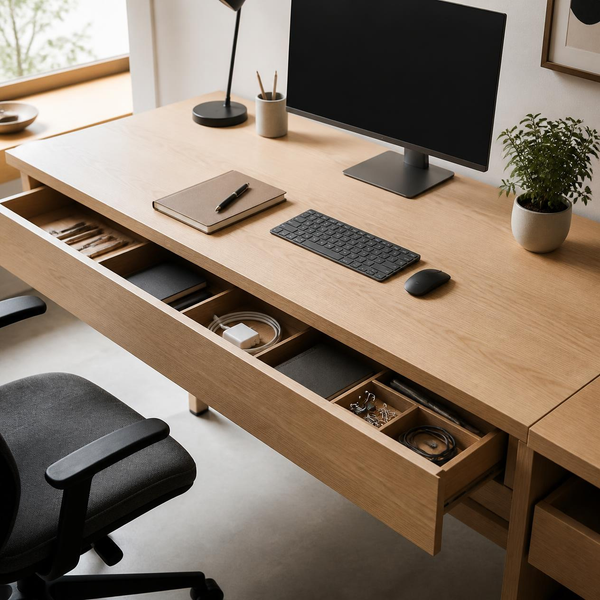
A minimal workspace setup designed for focused, deep work
A disorganized desk rarely starts with a massive explosion of mess. Instead, it happens gradually: a coffee mug left from yesterday morning, three rogue sticky notes, a tangle of charging cables, and a stack of loose papers you swore you would file “later.” Before you know it, your physical workspace feels suffocating, and your mental clarity suffers alongside it. Learning simple habits and hacks to keep your office desk clutter-free is one of the most effective ways to reclaim your attention span, decrease daily micro-stressors, and dramatically raise your overall output.
Why a Clean Desk Drives High Performance
Research in visual attention shows that physical environments significantly influence cognitive capacity. When your visual field is crowded with scattered items, your brain is constantly forced to filter out irrelevant stimuli. This visual noise drains mental stamina, making task-switching harder and increasing fatigue.
Beyond cognitive load, a streamlined desk saves time. The average professional wastes up to 4.3 hours a week searching for papers or digital items—a friction point that entirely vanishes once systematic organization takes over.
Core Habits: Maintaining Order Effortlessly
Hacks provide temporary relief, but long-term cleanliness relies on consistent daily behaviors. Incorporate these foundational routines to maintain control over your workspace.
1. Master the “Reset Routine” at Sunset
The most critical habit is setting a non-negotiable, 3-minute end-of-day desk audit. Before closing your laptop:
- Return notebooks and pens to their designated drawers.
- Trash or recycle scrap paper and sticky notes.
- Take used cups or water bottles straight to the kitchen.
Starting every morning with a completely clean slate eliminates decision fatigue before your workday even begins.
2. Enforce the “One-Touch” Rule for Paper
Paper remains the single largest contributor to office clutter. Adopt the One-Touch Rule: whenever a physical document hits your hands, act on it immediately. Either file it digitally, route it to its proper destination, or toss it into the recycling bin. Never set a document on your desk with the intent to “figure it out later.”
3. Establish Strict “Zones of Control”
Divide your desk surface into three distinct zones based on physical reach:
- Primary Zone (Immediate Reach): Reserved exclusively for active essentials—keyboard, mouse, mousepad, and notepad.
- Secondary Zone (Arm’s Length): Holds items used periodically throughout the day, such as a water bottle or monitor riser.
- Tertiary Zone (Outer Perimeter): Designated for passive elements like desk lamps, monitor lightbars, or a small plant.
Keep everything else completely off the primary surface.
Practical Hacks: Smart Systems for Desk Organization
While habits keep systems running, smart setup hacks do the heavy lifting for you.
1. Hide the Cable Chaos
Exposed power cords and charging cables create instant visual static. Implement a comprehensive cable management strategy:
- Mount an under-desk cable tray or raceway to hold power strips and excess cord lengths off the floor and out of view.
- Use magnetic cable clips attached to the edge of your desk to anchor daily charging leads (USB-C, phone chargers).
- Wrap bundled wires in woven sleeve tubing for a sleek, single-cable appearance.
An under-desk tray keeps cords invisible and off your workspace floor. Check out on Amazon.com
2. Elevate Equipment to Reclaim Real Estate
Desk real estate is limited; build vertically instead of horizontally.
- Monitor Arms or Risers: Elevating monitors frees up valuable desktop space underneath for a keyboard deck or a slim storage drawer.
- Monitor Lightbars: Replace bulky traditional desk lamps with a bar that clips directly onto the top of your screen, lighting your workspace without taking up an inch of desk space.

3. Digitization as Your Primary Defense
Physical clutter is often just deferred digital conversion. Go paperless wherever possible:
- Use phone scanning apps or a dedicated document scanner to digitize receipts, notes, and meeting agendas immediately.
- Transition to digital sticky notes (such as desktop widgets or task apps) instead of pasting physical paper notes around your monitor bezel.
Checkout 6 gaming desk organisation ideas for optimal performance on Ikea
4. Create a “Pending” Inbox Drawer
If your workflow involves high volumes of physical paperwork or incoming physical tasks, do not leave them strewn across your desk top. Dedicate one specific shallow drawer or a sleek wall-mounted inbox for “In-Progress” items. Once the task is done, clear the drawer.
Action Plan: Standard Desk System Checklist
| Item Category | Recommended Placement | Action / Rule |
| Keyboard & Mouse | Primary Zone | Always center-aligned to monitor |
| Active Notebook | Primary Zone | Only 1 notebook open at a time |
| Phone & Accessories | Secondary Zone | Keep on a dedicated vertical stand or wireless dock |
| Pens & Stationery | Drawer Storage | Store inside compartmentalized trays |
| Cables & Power Strip | Under-Desk Tray | Zip-tied and elevated off the floor |
| Loose Documents | Digital Archive | Scan immediately; shred or file paper |
Related: Creating a Zen Workspace for Enhanced Focus & Reduced Stress
Final Thoughts: Simplicity Breathes Productivity
Maintaining an organized workspace isn’t about creating a sterile, museum-like environment—it is about removing unnecessary friction between your mind and your work. By pairing daily micro-habits with a few strategic setup hacks, you can easily keep your office desk clutter-free and transform your desk into an inviting, high-efficiency launchpad for your best ideas.
Easy Mid-Day Recovery Techniques to Restore Focus and Improve Productivity Through the Day